
For UK shoppers trying to work out how to use One4all on Amazon, the most important point is that a standard One4all Gift Card should not automatically be treated as an Amazon Gift Card.
One4all says its physical and digital cards can be used online as prepaid Visa debit cards with participating One4all retailers, while Amazon has its own accepted payment methods and gift-card system.
That means a cardholder should first identify the type of One4all product they have, check the available balance and confirm whether Amazon is available through the relevant One4all exchange or eGift route.
If an Amazon-specific gift code is successfully obtained through an eligible route, that code can then be redeemed to an Amazon.co.uk account.
For anyone planning to spend the balance during a promotion, checking the purchase method before a sale begins can also help, particularly around events such as Amazon Spring Deal Days when popular products may be discounted for a limited period.
Can You Use One4all on Amazon UK?
A One4all Gift Card cannot simply be assumed to work directly on Amazon UK because it carries Visa functionality.
One4all’s official UK guidance states that its cards work as prepaid Visa debit cards when shopping online at participating retailers. Cardholders are specifically told to check whether the retailer accepts One4all online before attempting a transaction.
Amazon, meanwhile, maintains its own list of supported payment methods. Its current UK payment guidance includes major debit and credit cards and Amazon Gift Cards. Shoppers can check the latest options through Amazon’s official accepted payment methods.
The practical answer to can you use One4all on Amazon UK is therefore more nuanced than simply entering the card number at checkout.
A cardholder should:
- Check The Card Type Before attempting a payment
- Check The Available Balance To make sure enough money is available
- Check Current One4all Retailer Eligibility Rather than assuming Visa branding guarantees acceptance
- Check Exchange Options If the card or voucher is eligible for an eGift exchange
- Use An Amazon Gift Code Only When It Has Been Validly Issued Through an eligible route
Does Amazon Accept One4all Gift Cards Directly?
Amazon does not treat a One4all Gift Card as an Amazon Gift Card.
This distinction matters because selecting the “Gift Card” option on Amazon is intended for Amazon’s own gift-card balance or claim codes, not the 16-digit number printed on an ordinary One4all prepaid card.
One4all gives similar advice for its participating online retailers. A standard One4all card should normally be entered under Visa or Visa Debit Card, rather than under a retailer’s gift-card field.
However, that instruction applies when the online retailer participates in the One4all programme. It should not be interpreted as confirmation that every website accepting Visa will also accept One4all.
Why Is There Conflicting Advice About One4all And Amazon?
Much of the confusion comes from several products being described simply as “gift cards”.
A One4all Gift Card, One4all Exchange code and Amazon Gift Card are different products with different redemption processes.
There is also a difference between:
- Paying Directly With a One4all prepaid card
- Exchanging Value For a retailer-specific eGift
- Redeeming An Amazon Gift Card Into an Amazon account
- Using Amazon Gift-Card Balance To purchase eligible products
This is similar to other retailer-specific gift-card systems. A shopping-centre card, for example, has its own participating stores and redemption conditions, as seen with the Trafford Centre Gift Card. The fact that two products are called gift cards does not make their payment systems interchangeable.
How to Use One4all on Amazon?
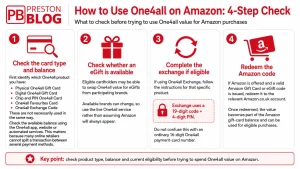
The safest method for anyone searching how to use One4all on Amazon UK is to check whether their specific One4all product provides an eligible exchange route before trying to use the card directly.
Step 1: Check The One4all Card Type And Balance
The cardholder should first establish whether they have:
- A Physical One4all Gift Card
- A Digital One4all Gift Card
- A Chip And PIN One4all Card
- A One4all Favourites Card
- A One4all Exchange Code
These are not necessarily used in the same way.
The balance should then be checked. One4all provides balance checking through its app, website and automated services. Knowing the exact available balance is particularly important because One4all states that many online retailers cannot split a transaction between several payment methods.
Step 2: Check Whether An Appropriate eGift Is Available
One4all’s UK online-spending guidance says eligible cardholders can swap One4all value for eGifts from a range of high-street and online brands.
The participating brands and available options can change, so a shopper should use the live service rather than assume Amazon will always appear.
The One4all online spending instructions provide the current official starting point for UK cardholders.
This is particularly important because availability can change over time. The same principle applies to normal retail promotions, where an offer that was available previously may no longer be active.
The changing status of promotions can be seen in areas such as Tesco F&F clothing offers, where shoppers need to check the live position rather than rely on an older promotion date.
Step 3: Complete The Exchange If Eligible
If the cardholder has a One4all Exchange product or reaches the appropriate exchange route, the instructions for that specific product should be followed.
The official One4all Exchange FAQs explain that an Exchange code and PIN are entered before the cardholder chooses an available eGift. The One4all Exchange site currently refers to a 19-digit code and four-digit PIN.
An ordinary 16-digit One4all payment-card number should not automatically be treated as a 19-digit Exchange code.
Step 4: Redeem The Amazon Code
If Amazon is offered for the cardholder’s eligible One4all product and an Amazon Gift Card or eGift code is successfully issued, the resulting Amazon code can be redeemed to the relevant Amazon.co.uk account.
Once redeemed, the value becomes part of the Amazon gift-card balance and can be applied to eligible Amazon purchases under Amazon’s gift-card conditions.
One4all Card Vs One4all Exchange Vs Amazon Gift Card
Understanding the difference between these payment methods makes using One4all on Amazon much easier.
| Method | What It Is | How It Is Used | Amazon Relevance |
| One4all Gift Card | Multi-retailer prepaid card | Used as Visa Debit with participating retailers | Direct Amazon acceptance should not be assumed |
| One4all Digital Gift Card | Digital prepaid One4all card | Card details accessed online or through the app | Same retailer eligibility checks apply |
| One4all Exchange | Exchange service or product | Uses an eligible exchange code and PIN | Available eGift brands must be checked |
| Amazon Gift Card | Amazon-specific gift value | Redeemed to an Amazon account | Can be used towards eligible Amazon purchases |
The key distinction is that an Amazon Gift Card is designed specifically for Amazon, while a normal One4all card is designed around One4all’s participating retailer network.
Gift cards can still be useful for controlling spending or combining savings with promotions. Similar strategies appear across other areas of UK retail, including shoppers comparing discounts and gift-card savings when looking for the best-value supermarket offers.
Can You Use a One4all Card As Visa on Amazon?
A One4all Gift Card can function like a prepaid Visa debit card at participating online retailers, but that does not mean a cardholder should assume it will work on Amazon simply because Amazon accepts Visa.
One4all’s normal online process involves:
- Checking Retailer Eligibility
- Making Sure The Basket Is Within The Card Balance
- Selecting Visa Or Visa Debit
- Entering The 16-Digit Card Number
- Entering The Expiry Date
- Entering The CVV2
- Using The Cardholder’s Own Name And Billing Address
How One4all Normally Works Online?
For a physical One4all Gift Card, the 16-digit card number, expiry information and CVV2 are used in the same fields that would normally be used for Visa Debit.
Digital One4all cards work in a similar way. The cardholder can access the card number, CVV2 and expiry date through the One4all app or account and then enter those details with a participating online retailer.
Importantly, One4all tells customers not to select a retailer’s “Gift Voucher” or “Gift Card” payment option when using an ordinary One4all card as a prepaid payment card.
Why A One4all Card May Be Declined on Amazon?
Several factors can explain why someone finds their One4all not working on Amazon.
Possible reasons include:
- Amazon Is Not Confirmed For That One4all Product: Retailer participation matters
- Insufficient Balance: The payment may exceed the amount available
- Split Payment Restrictions: Some online transactions cannot be divided across multiple payment cards
- Incorrect Card Details The card number, expiry date or CVV2 may have been entered incorrectly
- Incorrect Payment Category: A normal One4all card should not be entered as an Amazon Gift Card
- Authorisation Requirements: Some card types may require additional verification
If a payment fails, repeatedly attempting the same transaction is less useful than first checking the current payment and retailer rules.
What Is The Difference Between A 16-Digit One4all Card Number And A 19-Digit Exchange Code?
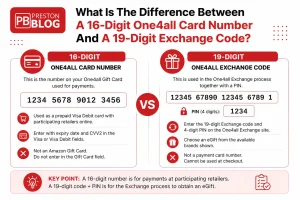
The two numbers serve different purposes and should not be confused.
16-Digit One4all Card Number
A standard physical One4all card uses a 16-digit card number for online payments with participating retailers.
Other details may include:
- Expiry Date Used in the normal card-payment field
- CVV2 Usually found beneath the scratch panel on a physical card
- Cardholder Name The shopper normally enters their own name
- Billing Address The shopper normally enters their own address
19-Digit One4all Exchange Code And PIN
One4all Exchange uses a different process.
Its current instructions tell users to enter:
- A 19-Digit Exchange Code
- A Four-Digit PIN
The available eGift can then be selected by following the on-screen prompts.
This means a shopper searching for One4all Exchange Amazon should first confirm that they actually have the appropriate exchange product or access to the relevant exchange route.
Find the route your card actually supports
A One4all card, a One4all Exchange code and an Amazon Gift Card may all involve gift value — but they do not use the same payment route.
Build your payment route
Choose what you have, then choose what you are trying to do.
Visa branding alone does not confirm Amazon acceptance
A standard One4all card can work as prepaid Visa Debit with participating online retailers, but Amazon should not be assumed to participate simply because it accepts Visa.
16 digits or 19 digits?
The article identifies two numbers that can easily be confused. Tap the number length to see what it actually represents.
For an ordinary online One4all payment, the card number is used alongside the expiry date and CVV2 in the Visa or Visa Debit fields of a participating retailer.
Why did the payment fail?
Tap the closest situation to see what the article says to check next.
Confirm the retailer route first
One4all prepaid Visa functionality applies to participating online retailers. Amazon accepting Visa by itself does not confirm that your One4all product is eligible there.
Can You Convert One4all to an Amazon Gift Card?
One4all's UK website confirms that eligible users can swap One4all value for eGifts from a range of high-street and online brands. However, this should not be turned into a blanket claim that every UK One4all Gift Card can always be converted into an Amazon Gift Card.
The available brands should be checked when the exchange is made.
If Amazon appears as an available option for the specific One4all product, the shopper can follow the displayed instructions. If Amazon does not appear, the cardholder should not assume that an old third-party workaround will still work.
How Does One4all Exchange Work?
The basic exchange process is:
- Enter the Required Code: Use the code specified for the exchange product
- Enter the PIN: Provide the associated four-digit PIN
- View Available Brands: Check the live selection
- Choose an eGift: Select an eligible retailer
- Complete the Exchange: Follow the on-screen instructions
- Use the Issued Retailer Code: Follow that retailer's redemption process
What To Do If Amazon Is Not Available As An Exchange Option?
If Amazon is not listed, a cardholder still has other choices.
The One4all balance can generally be spent with participating retailers for that card type. The retailer list should be checked because physical, digital and Favourites cards can have different participating brands.
A shopper should also avoid buying another retailer's gift card as a workaround unless the seller specifically permits gift-card purchases using One4all. Gift-card-on-gift-card transactions can be restricted by retailers.
One4all UK Vs Ireland: Which Instructions Should Be Followed?
UK cardholders should follow UK One4all instructions.
This matters because One4all operates different services and retailer arrangements across jurisdictions. An Irish One4all webpage may display products or eGift brands that do not establish availability for a UK-issued card.
The One4all.ie eCodes material supplied for this article, for example, relates to the Irish service and states that its eGifts are redeemable in Ireland. It should therefore not be used as proof that the same Amazon eGift arrangement applies to every UK One4all product.
For a UK audience, current One4all UK information should take priority.
What If One4all Does Not Work on Amazon?
When a One4all card is declined on Amazon, the first step should be diagnosing the payment route rather than repeatedly submitting the card.
Check The One4all Balance
The balance may be checked through the One4all app or online balance service. One4all states that if an online purchase exceeds the available balance, the payment can fail because many online retailers do not support split-card payments.
Check The Card Details
For an ordinary One4all online card payment, the shopper should confirm:
- The 16-Digit Card Number
- The Expiry Date
- The CVV2
- The Cardholder Name
- The Billing Address
Check Amazon's Payment Restrictions
Amazon's accepted payment methods and transaction rules should be checked before another attempt is made. Payment acceptance can depend on the type of transaction being completed.
Check Current One4all Exchange Options
If the aim is to convert One4all to an Amazon gift card, the live eGift or exchange selection should be checked rather than relying on an older article or social-media post.
Cardholders should also protect their card number, CVV2, PIN and exchange codes. Unexpected texts or emails requesting payment details should be treated cautiously. Similar risks arise with fake parcel-payment requests, which is why checking the real destination of a payment link is important when dealing with messages such as a Royal Mail Fee to Pay request.
One4all Fees, Expiry And Balance Rules
A One4all balance is worth checking before deciding how and where to spend it.
Current UK One4all information says standard cardholders generally have an initial 18-month period before a monthly card charge begins.
One4all currently lists that charge as 90p per month, starting from the 19th month for applicable cards and continuing until the balance reaches zero. Different One4all products can have different conditions, so the terms for the specific card should be checked.
Does A One4all Gift Card Expire?
One4all's current terms state that applicable card funds do not simply disappear because the "Valid Thru" date printed on the card has been reached. Where funds remain, the cardholder can contact One4all regarding replacement, subject to the applicable terms.
The more important issue for many cardholders is the monthly charge that may begin after the applicable charge-free period.
Are There Fees For Keeping A One4all Balance?
For applicable UK One4all cards, a 90p monthly charge can begin after 18 months.
That means someone who receives a One4all card and plans to use it eventually may benefit from checking the balance and spending it before recurring charges begin.
Retail promotions can sometimes help stretch that balance further, but the saving should be checked at the point of purchase because offers change.
The same principle applies whether someone is buying through Amazon or monitoring changing high-street and online shopping deals.
Conclusion: How to Use One4all on Amazon?
For anyone asking how to use One4all on Amazon, the safest answer is not to assume that a normal One4all Gift Card can simply be entered at Amazon checkout.
A UK cardholder should first identify the type of One4all product, check the balance and establish whether the relevant card can be used with the retailer or whether an eligible eGift exchange option is available.
If an Amazon Gift Card is genuinely offered through the applicable exchange route, the resulting Amazon code can be redeemed to an Amazon.co.uk account and used towards eligible purchases.
If Amazon is not available, the shopper should use the One4all balance with a confirmed participating retailer rather than relying on an outdated workaround.
The important distinction is simple: a One4all Gift Card, a One4all Exchange code and an Amazon Gift Card are not the same thing. Checking the correct payment route first can prevent declined transactions and make the remaining balance easier to use.
Frequently Asked Questions
Can You Use One4all on Amazon UK?
A standard One4all card should not automatically be assumed to work directly on Amazon UK. One4all says its prepaid Visa functionality applies to participating online retailers, so the relevant retailer or exchange eligibility should be confirmed before payment is attempted.
How Do You Use One4all on Amazon?
The cardholder should check the One4all product type and balance, then check whether an eligible Amazon eGift or exchange option is available. If an Amazon Gift Card code is legitimately issued, it can then be redeemed to the relevant Amazon.co.uk account.
Can You Convert One4all to an Amazon Gift Card?
One4all confirms that eligible UK cardholders can exchange value for eGifts from participating brands, but Amazon availability should be checked through the live service. It should not be assumed that every One4all product can always be converted to an Amazon Gift Card.
Can You Use A One4all Card As Visa on Amazon?
One4all cards operate like prepaid Visa debit cards with participating online retailers. Visa acceptance on a website by itself does not confirm that the retailer participates in One4all's programme.
Why Is My One4all Card Being Declined on Amazon?
Possible reasons include retailer eligibility, insufficient One4all balance, incorrect card details, payment restrictions or using the wrong payment field. The cardholder should check both One4all's current rules and Amazon's accepted payment methods before trying again.
What Is A One4all Exchange Code?
A One4all Exchange code is used with the One4all Exchange service to select an available eGift. The current Exchange instructions refer to a 19-digit code together with a four-digit PIN.
Does A One4all Gift Card Expire?
Current One4all UK terms state that applicable card funds do not simply expire at the printed Valid Thru date, although monthly charges may begin after the relevant charge-free period. For many standard cards, the current monthly charge is 90p after 18 months.